Export Products
An Excel file with one row per combination and its mapping state — the fastest way to audit the whole catalogue.
Open Export Products
The link opens the screen directly in the Integration Dashboard.
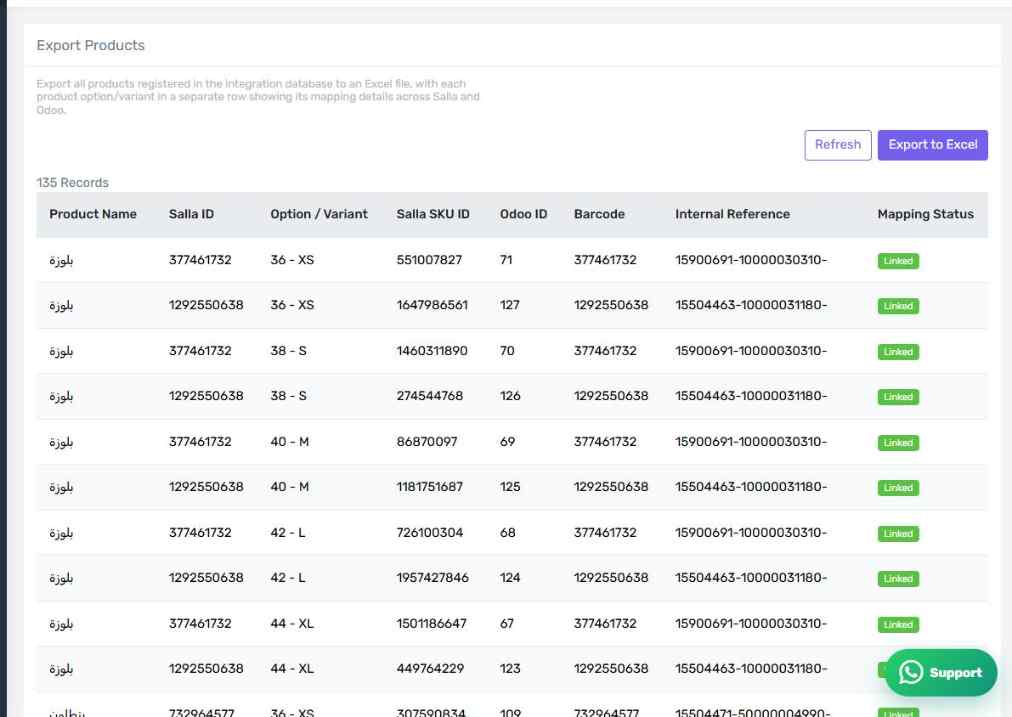
The Export Products screen
How the screen appears in the Integration Dashboard.
What the file contains
One row per option or combination, and in each row:
- Product name
- Salla ID and Salla SKU ID
- Odoo ID
- Barcode and internal reference
- Mapping status: linked or not linked
How to use it
Export the file and sort by the Mapping Status column. Every "not linked" row is a product whose orders will fail. This is the quickest way to see the size of the remaining work in one go, especially on large catalogues that are painful to page through.
Useful for support too
If you contact support about a mapping problem, attach this file: it saves both sides several rounds of questions.