The Accounting tab
Taxes, invoice date, cancellation method, analytic account, and the price update policy.
The Accounting tab
How the screen appears in the Integration Dashboard.
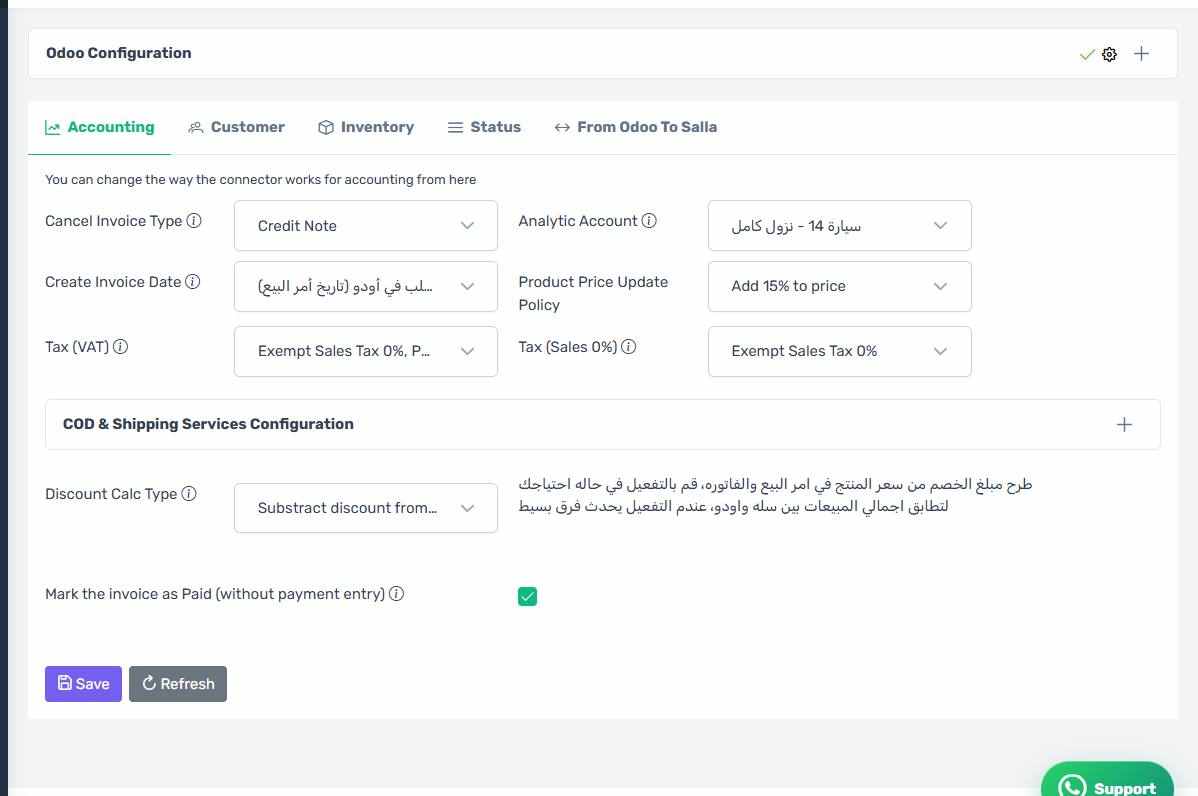
Cancel Invoice Type
Decides what the connector does when an order reaches a cancelling status:
- Credit note — creates a reversing invoice and leaves the original untouched. This is the accounting-correct option once an invoice is posted.
- Set the invoice back to draft — returns the invoice to draft. Not viable if the accounting period is locked.
Analytic Account
An analytic account added to the product lines, if you use analytic accounting to track sales by channel. Leave it empty if you do not.
Create Invoice Date
Decides which date is recorded on the Odoo invoice: the Salla order date, or the date the invoice is actually created. Choose whichever matches your accounting policy.
Product Price Update Policy
Decides when an item's price in Odoo is updated from Salla when products are transferred.
The two taxes
- Tax (VAT) — the tax applied to items that are taxable in Salla.
- Tax (Sales 0%) — the tax applied to items that are not.
Leave both empty and the connector uses Odoo's default tax, which produces total mismatches if the default is not the right one.
The wrong tax shows up as a total mismatch
The most common complaint is that the Odoo invoice total differs from the Salla order total. In most cases the cause is a mismatched tax here, or the discount setting on the "Discounts" page.
ZATCA Reasons
The list of reasons used when issuing a credit note for e-invoicing. Relevant if you use e-invoicing in Saudi Arabia.
Automatically Send Invoices to ZATCA
This switch lives on this tab, but appears only when your Odoo version is 19.3 or later. See the full ZATCA section.
Open Configuration
The link opens the screen directly in the Integration Dashboard.