The Status tab
The single most important setting in the connector: which Salla order status triggers which Odoo step.
1Without this tab the connector does nothing
The connector does not guess. If a status is not in a step's list, that step never runs — and no error appears. It simply looks as though the connector is broken.
2The Status tab
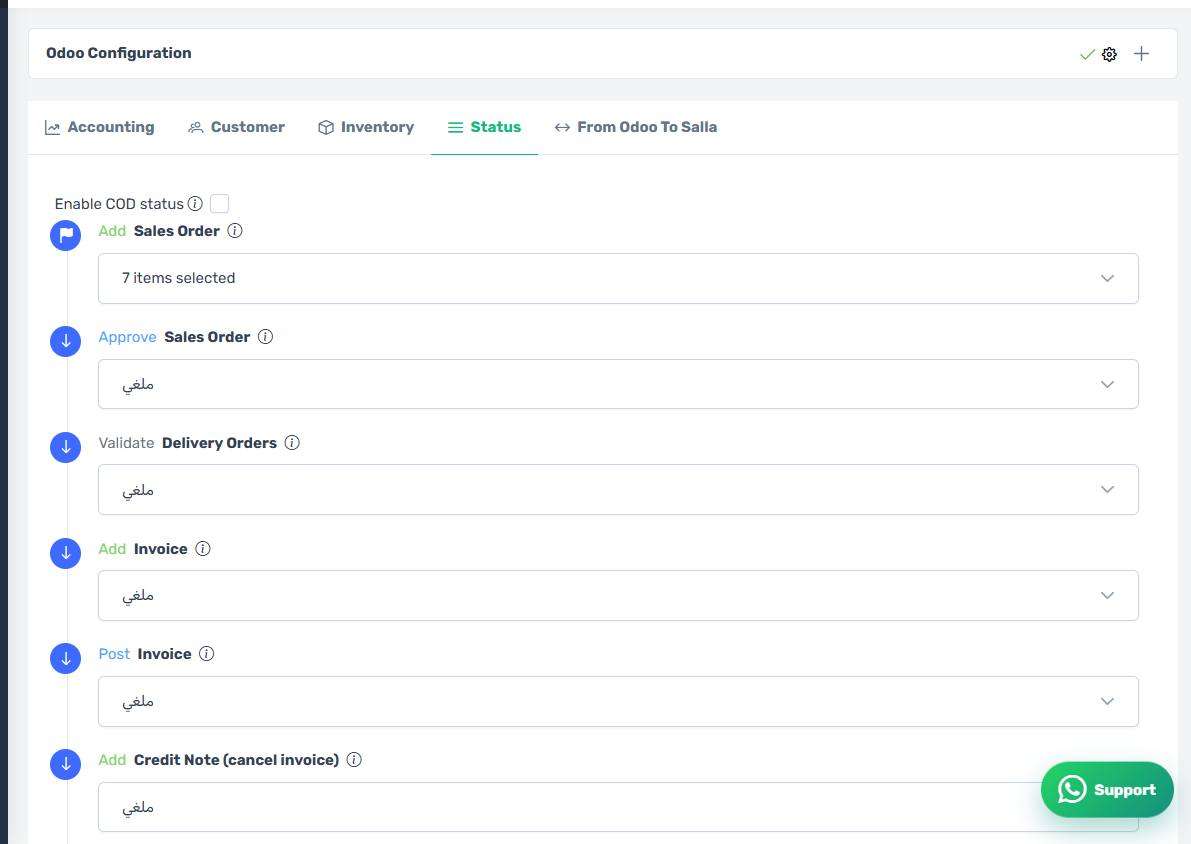
How the screen appears in the Integration Dashboard.
3The idea in one line
Each Odoo step has a list where you pick Salla order statuses. When an order reaches a status in that list, the matching step runs.
4The selling steps
- Create sales order — the first step; nothing else happens before it.
- Approve sales order — turning a quotation into a confirmed order.
- Validate stock picking — taking the goods out of the warehouse.
5The invoicing steps
- Create the invoice.
- Post the invoice.
- Create the payment entry.
Order them sensibly: do not put a status in "pay" that is not in "post" or earlier, or paying fails because the invoice is still a draft.
6The cancellation and return steps
- Cancel the invoice — creates a credit note or returns the invoice to draft, depending on your accounting setting.
- Pay the credit note.
- Cancel the sales order.
- Cancel the delivery order.
- Deduct stock and restore stock.
Put statuses such as "cancelled" and "returned" in these.
7Pick every plausible status
On a busy store the connector may not see every status change in order. Selecting every status that precedes the step — "under review" and "in progress" as well as "completed" — makes the step run at the first status that arrives, instead of being missed.
8The steps run in a fixed order
However oddly you arrange the lists, the connector runs the steps in its own fixed internal order on every event. See "The order pipeline".
9Save, then test
After saving, create a test order in Salla, move it through the statuses, and follow it on the Orders screen. Do not rely on reading alone for this tab.