Separate statuses for cash on delivery
A second, complete set of status lists that applies to cash-on-delivery orders only.
Why it exists
Many stores treat cash on delivery differently: the invoice is only issued on actual delivery, whereas an online-paid order is invoiced immediately. The Enable COD status switch opens a second, complete set of lists for those orders alone.
Danger: empty lists stop COD orders completely
With this switch on, the connector stops reading the normal lists for any cash-on-delivery order and reads the COD lists instead. Leave them empty and nothing at all happens to those orders — with no error anywhere.
This is the most confusing failure in the whole connector: the store works, online-paid orders arrive, and COD orders silently vanish.
Needs the Tecfy addon
This feature needs the Tecfy addon installed inside Odoo. Without it the setting appears but does nothing.
Without the addon the split does not take effect even with the switch on and the lists filled.
How to set it up
- Install the Tecfy addon in Odoo and turn its switch on in the Configuration panel.
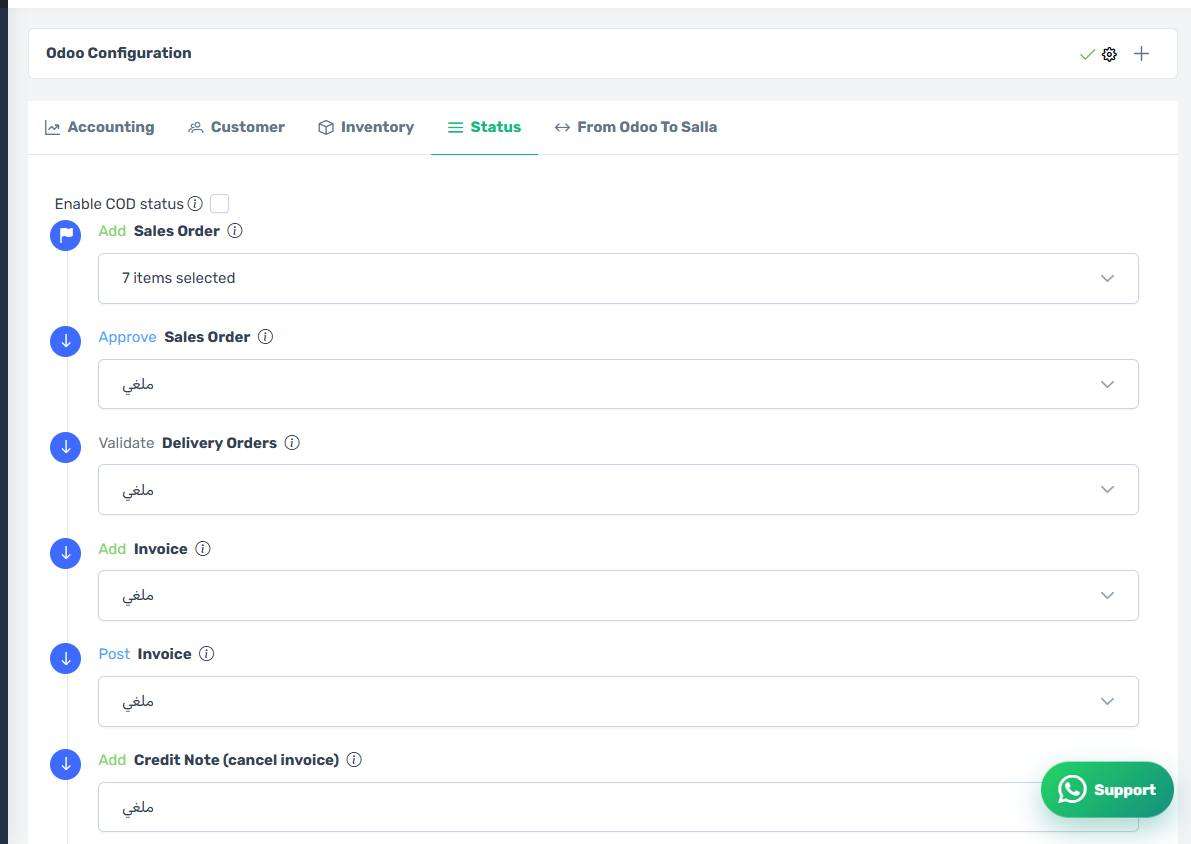
- Turn on Enable COD status on the Status tab.
- Fill in every new list that appears, not just some.
- Save, then test with one COD order and one online-paid order.
The COD status lists
How the screen appears in the Integration Dashboard.
If you do not need it
Leave the switch off. The normal lists then apply to every order whatever the payment method, which suits most stores.