The Orders screen
Finding an order, following its state in Odoo, and retrying, resetting or deleting it.
It may not appear for you
The Orders screen appears only when import is allowed for your account. If it is not in your sidebar, contact support.
Open Orders
The link opens the screen directly in the Integration Dashboard.
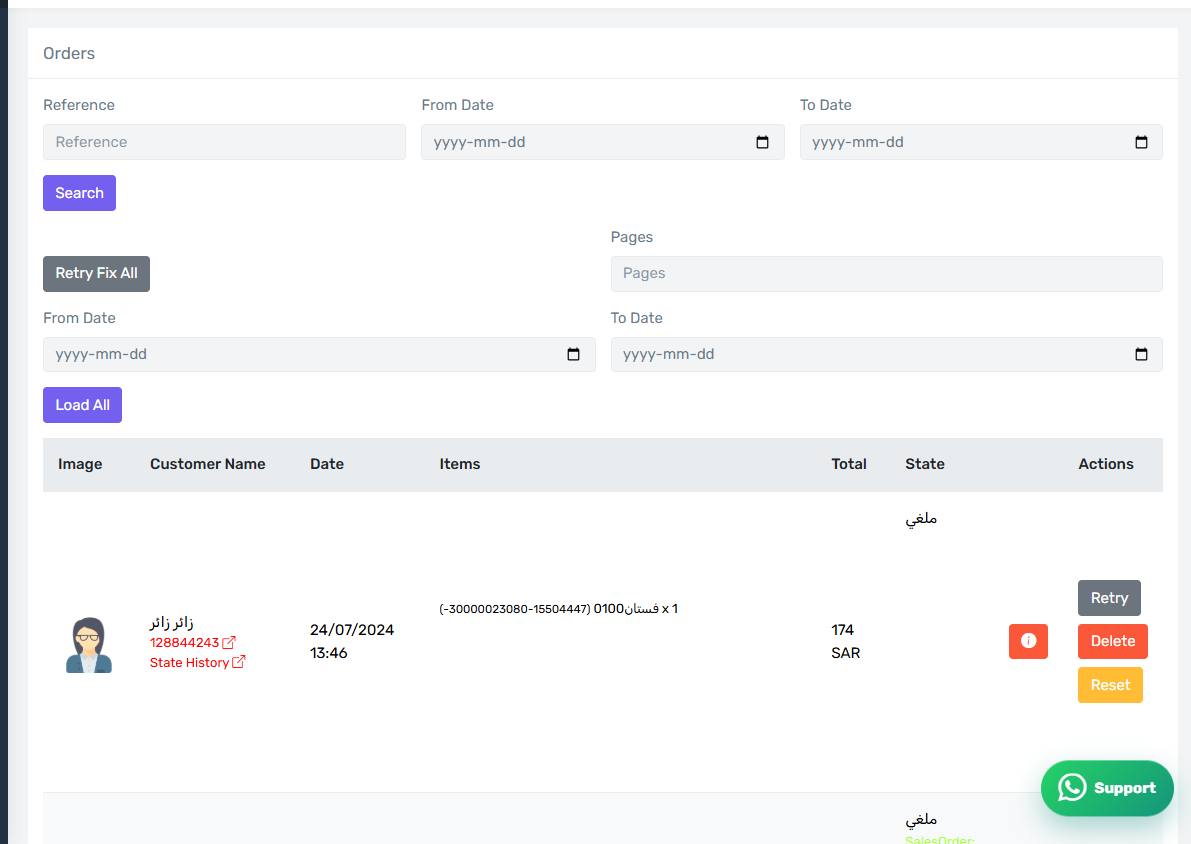
The Orders screen
How the screen appears in the Integration Dashboard.
Searching
Search by the Salla reference to reach one specific order, or set a from and to date to list a whole period.
What a row shows
The first product image, the customer name, the order date, the item count, the total, the Salla status, and then a set of badges summarising what has been done in Odoo. The badges are explained on the next page.
Three buttons on the row
- Retry — runs the Odoo steps for this order again, now.
- Reset — clears what the connector recorded about the order so it starts fresh.
- Delete — removes the order from the connector database.
The difference between the last two matters and is explained in "Resetting or deleting an order".
Retry Fix All
The Retry Fix All button retries every order in the list. Useful after fixing a shared cause such as a missing journal.