Sending the status back to Salla
Updating the order status in your store from the sales-order status in Odoo.
The reverse direction
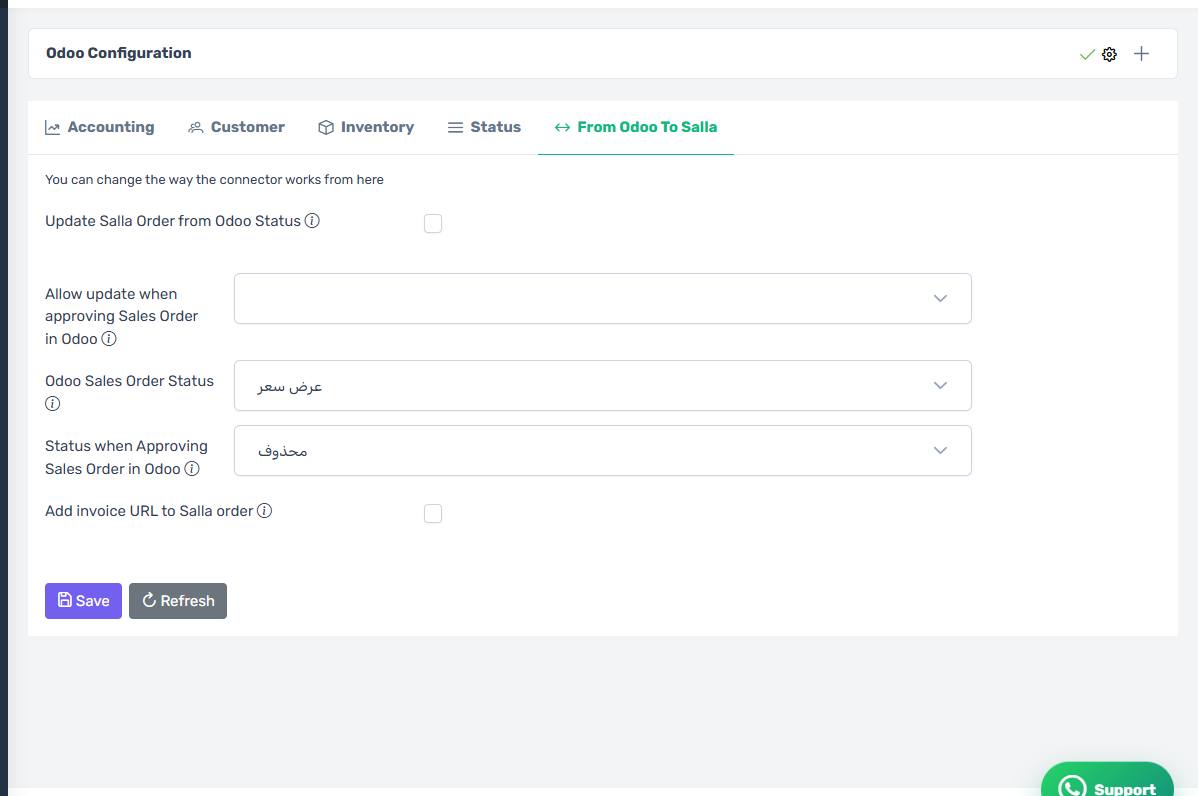
Everything so far has been Salla to Odoo. This feature works the other way: when the Odoo sales-order status changes, the connector updates the Salla order status, so the customer sees their order progress without you touching the Salla dashboard.
How to set it up
On the From Odoo to Salla tab:
- Turn on Update Salla Order from Odoo Status.
- Choose the Odoo sales order status that triggers the change.
- Choose the Salla status the order moves to.
Protect delivered orders
Under status when approving the sales order, choose only statuses that are safe to change. Without that, the connector can move an order the customer has already received back to an earlier status on any Odoo edit — the customer gets a wrong notification and the courier is confused.
Needs the Tecfy addon
This feature needs the Tecfy addon installed inside Odoo. Without it the setting appears but does nothing.
The status write-back settings
How the screen appears in the Integration Dashboard.