Salla Product Quantity Log
A complete log of every quantity change the connector sent to Salla: when, how much, and why.
Open Salla Product Quantity Log
The link opens the screen directly in the Integration Dashboard.
The quantity log screen
How the screen appears in the Integration Dashboard.
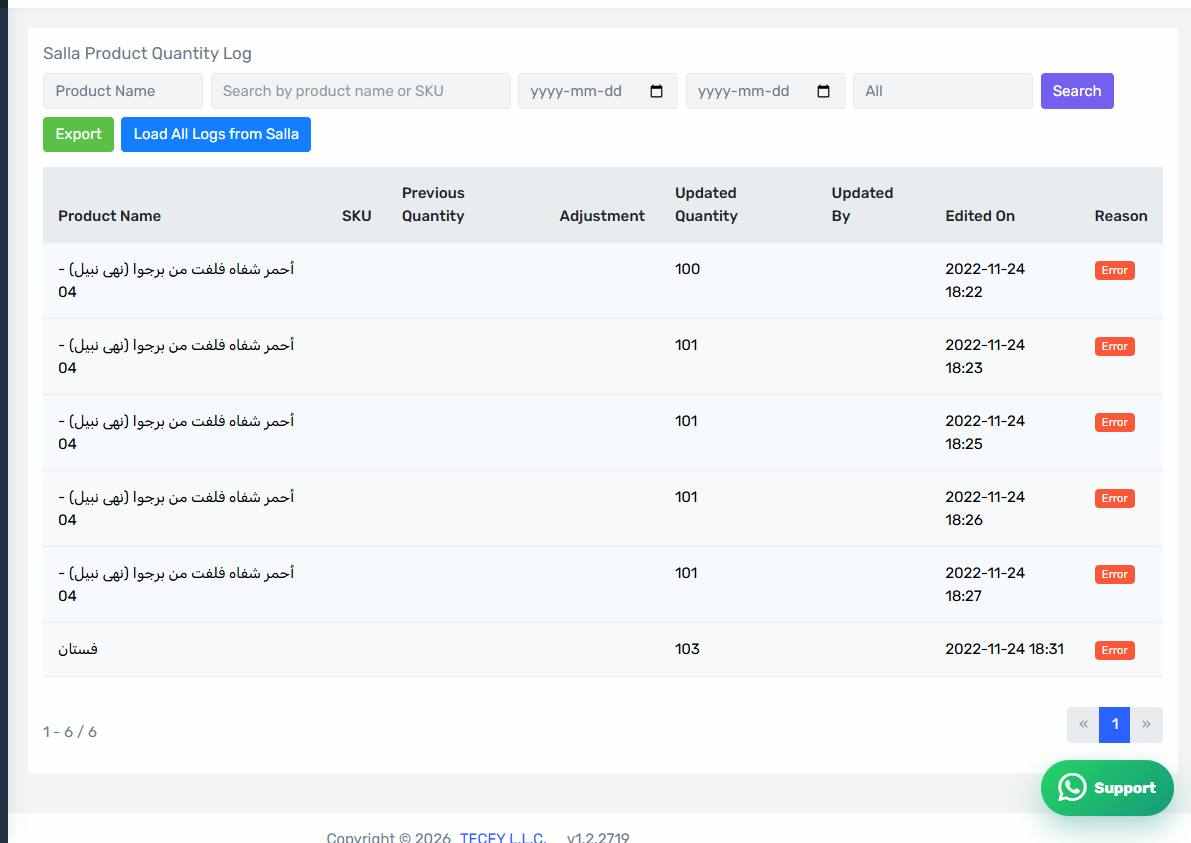
The columns
- Product Name and SKU
- Previous Quantity — what it was before.
- Adjustment — how much it went up or down.
- Updated Quantity — what it became.
- Updated By — the source of the change.
- Edited On
- Reason
Filters and search
Search by product name or SKU, and filter by date range and by update source. Use this screen to answer "when did this item's quantity change, and what changed it?".
Exporting to Excel
The whole filtered log — not just the visible page — exports to Excel, which is what you want for an audit or a stock-count review.
Load All Logs from Salla
Attempts to fetch a historical log from Salla itself, to cover the period before this log existed. A long operation, usually run once.
Manual edits in Salla are not captured
This log records only what the connector sent. If someone edits a quantity directly in the Salla dashboard it does not appear here at all, because Salla does not notify the connector of it.
If you see a Salla quantity that does not match Odoo and there is no line for it in this log, the likeliest explanation is a manual edit in Salla.