Salla Events
A log of every notification Salla sent the connector. The first place to look when "nothing happens".
Open Salla Events
The link opens the screen directly in the Integration Dashboard.
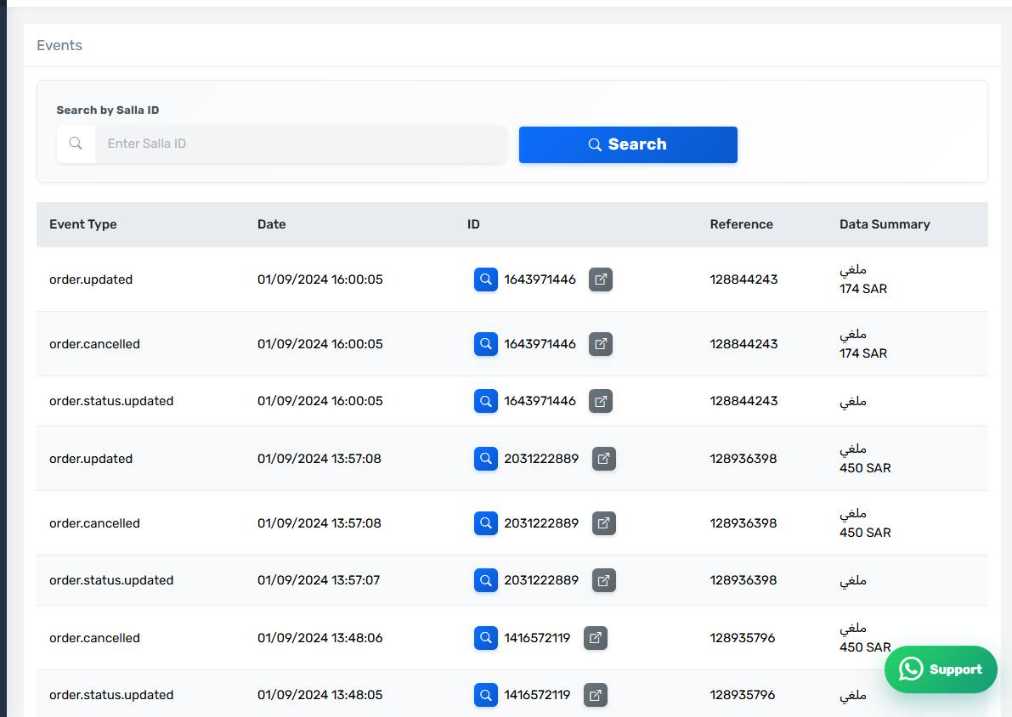
The Salla Events screen
How the screen appears in the Integration Dashboard.
Why this screen matters
The connector only acts when Salla notifies it. If the notification never arrives, nothing happens and no error appears on any screen, because the connector does not know there is anything to do.
This screen answers the first question in any diagnosis: did Salla tell the connector or not?
The columns
- Event type — order created, status updated, product updated, and so on.
- Time and date.
- ID or reference — the order or product the event concerns.
- Data summary.
The payload inspector
Press Inspect on any row to see the full JSON exactly as Salla sent it. This is what support usually asks for when diagnosing a complicated problem.
How to use it when diagnosing
If an order did not reach Odoo:
- Look for an order status updated event for that order number in this log.
- Not there — the problem is between Salla and the connector. Check the red banner and "Reauthorizing the app".
- There — the problem is after receipt: check the Status tab and the error screens.
Events received but not acted on
You will find events in the log that the connector does not act on, such as a shipping-address or coupon edit. Their presence is normal and does not mean anything was lost. See "What Salla tells the connector".