The dashboard
Reading the Salla statistics and the connector database statistics, and what a gap between them means.
Open the dashboard
The link opens the screen directly in the Integration Dashboard.
The dashboard
How the screen appears in the Integration Dashboard.
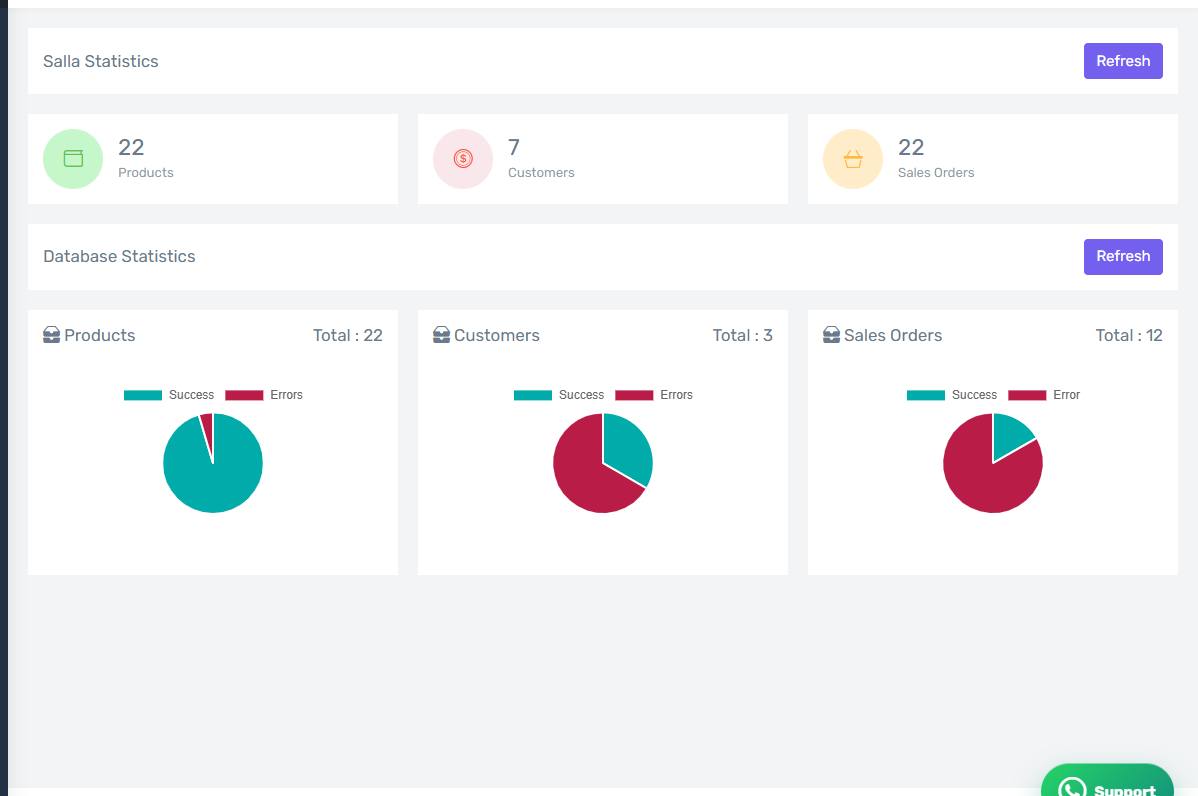
Two panels, not one
Salla Statistics is read live from your store the moment you open the page: how many products, customers and sales orders exist in Salla.
Database Statistics shows what the connector service actually holds about your store.
A gap is sometimes expected
The two numbers are not required to match. The connector holds only what reached it:
- If you installed the app recently, older orders are not there until you pull them.
- If the database product count is far lower, the products have probably not been loaded — see "Loading your products".
A gap in orders that opens up suddenly, however, is a signal — start from "An order did not reach Odoo".
The numbers do not refresh by themselves
The numbers are read when the page opens. Reload the page to see fresh ones.