From order to invoice
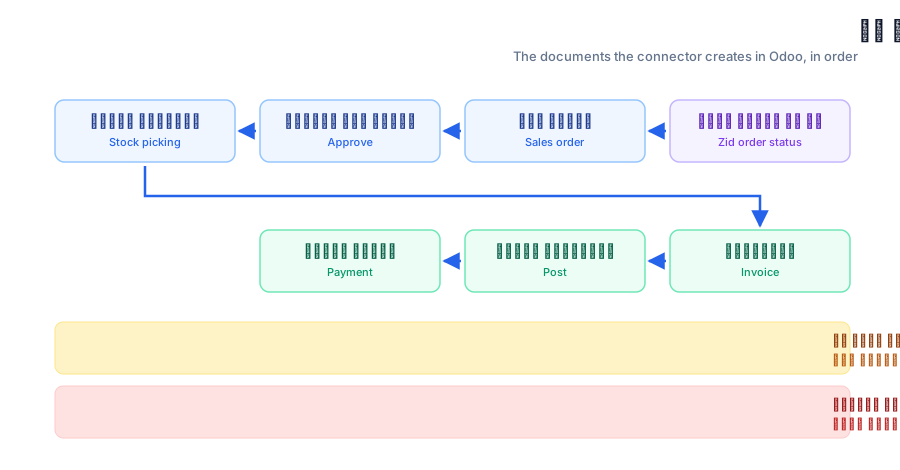
The documents the connector creates in Odoo, in order, and what triggers each one.
11. The sales order
The first document created. It carries the order lines, the customer, shipping charges and discount. You choose which status creates it on the Status tab.
2The documents, in order
The whole path, from the Zid order status to the payment recorded in Odoo.
32. Approving the sales order
Turns the sales order from a quotation into a confirmed order in Odoo. After approval, the connector stops updating its lines from Zid.
43. The stock picking
The delivery order that takes goods out of your warehouse. Validating it is what actually deducts the quantity from your Odoo stock.
54. The invoice
Created from the sales order, then posted so it becomes an official invoice recorded in your books.
65. The payment
The payment is registered against the invoice, in the journal you chose for that payment method or shipping company.
7Cancellation and credit notes
If the order is cancelled in Zid, the connector unwinds what it created: cancels the delivery and the sales order, and either cancels the invoice or issues a credit note depending on your setting.
8Not every step is required
Each step is tied to a status list. Leave a list empty and its step never runs. Some merchants create only the sales order and handle the rest in Odoo by hand.