What the connector does
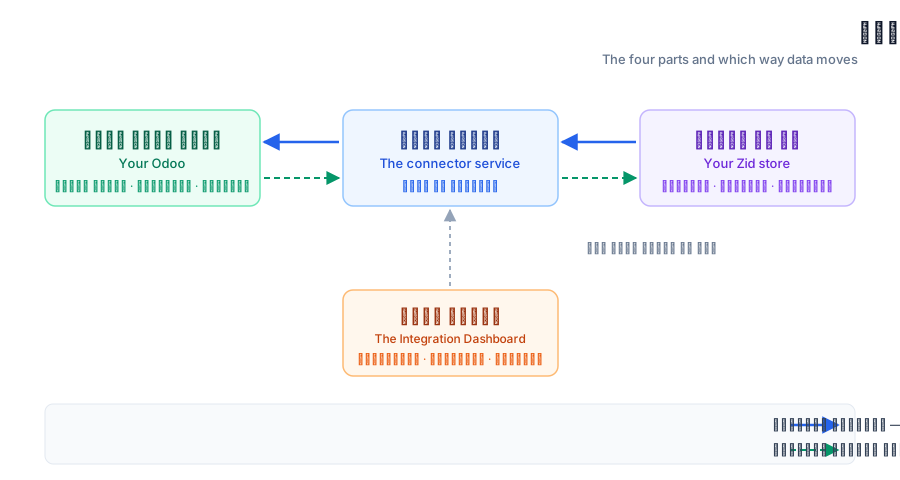
The four moving parts, and which direction data moves between each pair.
The idea in one line
The connector moves your data between your Zid store and Odoo automatically: orders, customers, products and quantities. You never enter an order twice.
The four parts
1. Your Zid store — the source of orders, customers and products.
2. The connector service — runs in the background, receives events from Zid and carries them out in Odoo.
3. Your Odoo — where sales orders, invoices and stock moves are created.
4. The Integration Dashboard — the screens you are reading about: configuration, monitoring, and error handling.
The four parts and which way data moves
The solid line is the main direction, which works automatically. The dashed line is optional and you switch it on from the "From Odoo to Zid" tab.
Which way data moves
From Zid to Odoo (the main direction): a new order, an order status change, a payment status change, a new customer, a new or edited product.
From Odoo to Zid (optional, you switch it on): order status, product quantities, product data, and the invoice URL.
The connector does not work alone
Three things are needed before anything syncs: the app installed on your Zid store, a working connection to Odoo, and your order statuses configured. The next three sections cover exactly that, in order.
Open the Dashboard
If the app is already installed, this link opens the Integration Dashboard directly.