Validate Stock Picking Error
Delivery orders the connector could not validate, so the goods were never taken out of the warehouse.
Open Validate Stock Picking Error
The link opens the screen directly in the Integration Dashboard.
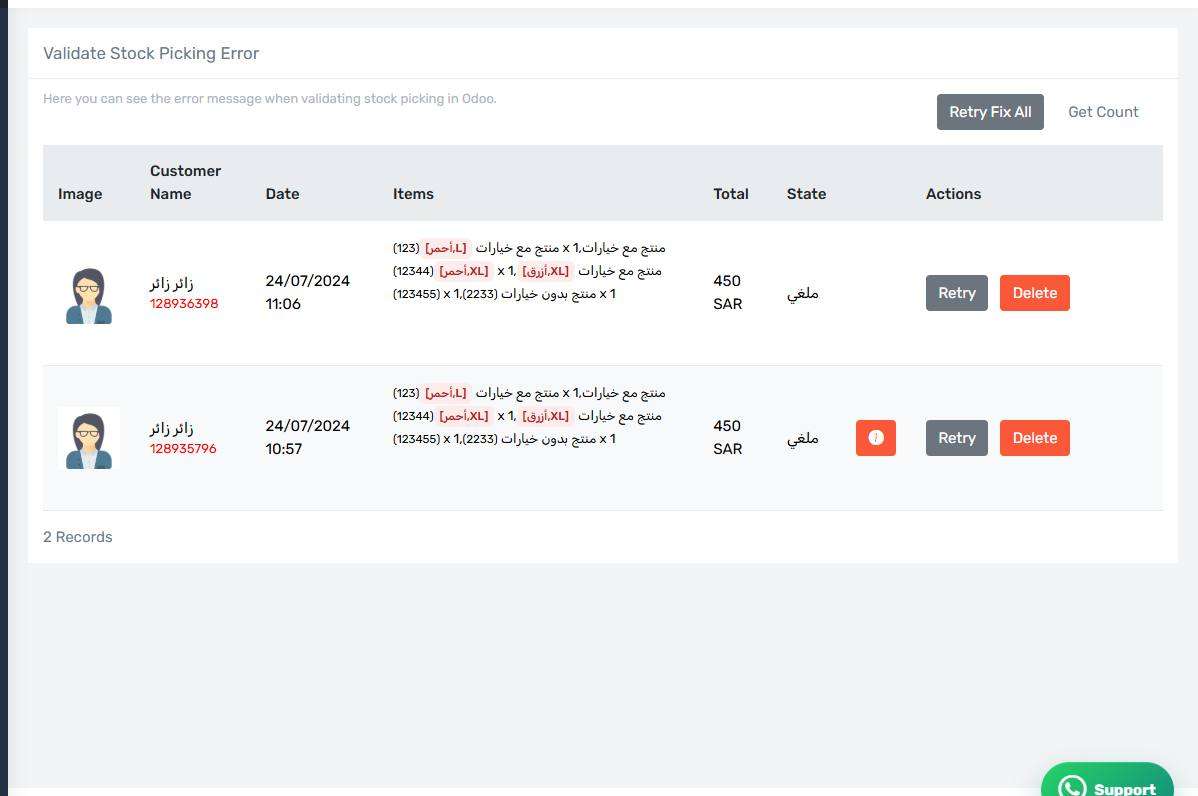
The Validate Stock Picking Error screen
How the screen appears in the Integration Dashboard.
What this screen lists
Delivery orders the connector could not validate, so the goods were never taken out of the warehouse.
Common causes
- Insufficient quantity in the chosen stock location. This is the leading cause by a wide margin.
- The wrong source stock location on the Inventory tab, so the goods are somewhere else.
- The item is not storable in Odoo, so its quantity is not tracked.
- Serial numbers or lots are required on the item and none were assigned.
How to clear it
Read the Odoo message on the row — it says exactly what is missing. Fix the cause in Odoo or in your settings, then press Retry on the row, or Retry Fix All if the cause is shared across every row.
Check the earlier screen first
If the same order appears on more than one error screen, start with the earliest in the pipeline. Fixing the first step usually clears the ones after it.